Three sets, four bars, 84 slots: Blizzard's guide to playing Forever with a gamepad
Three sets, four bars, 84 slots: Blizzard's guide to playing Forever with a gamepad
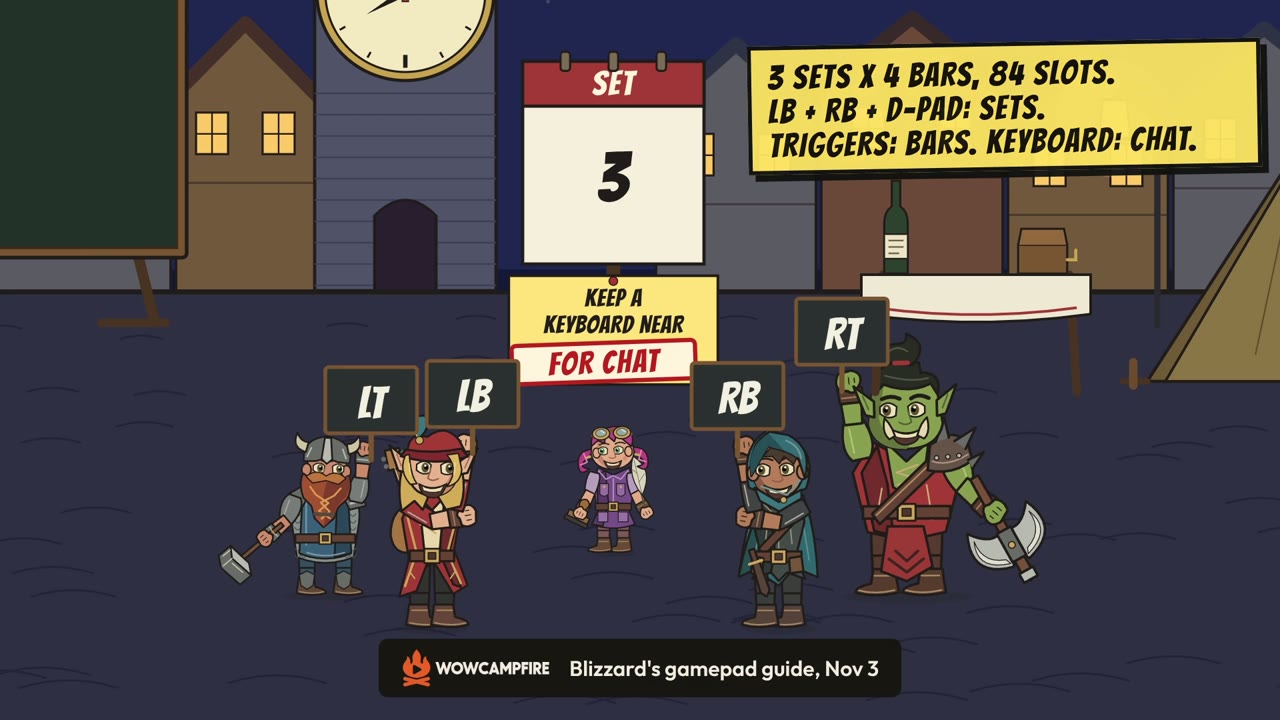
Blizzard's 3 November gamepad guide explains how a controller reaches 84 spell and ability slots: four bars in each of three sets, switched with the triggers and with LB + RB on the D-pad. Here is the layout as Blizzard describes it, the shoulder-button shortcuts and the one task it says still needs a keyboard, with nothing tested in the game.
4 min read
Listen to this article
In this article
Blizzard published a guide to playing Forever with a gamepad at 20:00 UTC on 3 November. It sets out how a controller reaches 84 spell and ability slots: three sets of action bars, with four bars in each set. It also names one task that still needs a keyboard: typing in chat. We read the guide in full and haven't tried any of it with a controller. Blizzard calls gamepad support a functional beta, so the launch client may change.
Turning it on
Press Escape to open the Game Menu, choose Options, then pick Gamepad under Gameplay. That switches you away from keyboard-and-mouse input. Blizzard says Forever supports all XInput-compatible controllers and shows Xbox and PlayStation button icons. The guide names its buttons the Xbox way, so we do too.
The Gamepad settings cover Camera, HUD Modifier, Frame Focus Style, Action Bars, Targeting and Raid Targeting Options. On controllers with supported lighting, the light turns red for a Horde character and blue for an Alliance one.
The basic controls
The left stick moves your character and the right stick moves the camera. The left bumper (LB) selects a friendly target and the right bumper (RB) a hostile one. The controller map lists X for Interact, A for Jump, B for Back and Y for Inspect, and Blizzard notes that these buttons also have spell functions. The Menu button opens the Main Menu, and the View button, the one marked with overlapping squares, is listed as Change Focus Frame.
Four bars from one set of buttons
The gamepad HUD shows four action bars. Each uses the same button layout but can hold different spells and abilities. Hold LT, RT, or both triggers together to switch to another bar, and let go to return to the default one. The HUD changes to show what's on the bar you're using.
Blizzard's own example is a Mage with four spells on one directional button:
- Up: Polymorph (Sheep)
- LT + Up: Fireball
- RT + Up: Frostbolt
- LT + RT + Up: Blizzard
Those are examples, not fixed bindings. You choose what goes where.
Three sets, 84 slots
Bars come in sets. To switch between the three action bar sets, hold LB + RB and press Left or Right on the directional pad. Each set's four bars hold 28 slots between them, which is how Blizzard reaches 84 customizable slots across all three. The button layout stays the same as you change sets, so the same buttons reach a different group of abilities without opening a menu. Blizzard suggests separate sets for combat, for utility abilities or for the things you use most.
LB + RB as a shortcut key
Holding both shoulder buttons does more than change sets. With LB + RB held:
- B opens your Backpack.
- Up reaches the Quest Tracker.
- Down reaches Chat.
- Y lets you manage your buffs.
The same features are in the main radial menu. The shortcuts just get you there directly.
The guide gives these in two separate lists, but put them together and the same hold does several jobs: Left and Right on the D-pad switch sets, while Up, Down, B and Y reach parts of the HUD.
Where to look on screen
A gamepad legend sits in the upper-left corner of the main screen and expands to show more options when you take certain actions. Most screens also have gamepad footers showing what you can do in that panel. Not every screen has one yet. Blizzard says interface work is ongoing, including making bags and menus easier to use with a gamepad.
Chat still needs a keyboard
The LB + RB + Down shortcut takes you to Chat, but Blizzard says typing there still needs a keyboard, and tells players to keep one within reach for tasks such as typing in-game chat. Blizzard says reducing the need for a keyboard remains a goal, with a keyboard-free experience as the longer-term aim. It gives no date for that.
What this doesn't tell you
The guide is an instruction sheet, not a test. It doesn't say how well any of this works in a raid or in PvP, which controllers it was tested on beyond the XInput statement, or which classes fit 84 slots most easily.
If you followed the beta, our log of the controller changes Blizzard listed build by build covers the earlier work, from Edit Mode support to pet and quest fixes. This guide is the newer picture: three sets of four bars, 84 slots, LB + RB plus the D-pad to change sets, the triggers to change bars, and a keyboard nearby for chat.
Sources
More in Technical help and controls
All 13 articles
The 10 best WoW: Forever add-ons, and where to download them
Technical help and controls
Watch on YouTubePlayback connects to YouTube / Google.

How to link your guild's Discord to Forever, and what members need to enable
Technical help and controls

Two addon lists for launch, and the question both are asking
Technical help and controls
Why Forever runs on modern code
Technical help and controls
Latest articles
All articles
Enhancement players split over Stormstrike's 8-second cooldown: a lost Shock rhythm or the Windfury lottery
Classes, races and leveling

November 10 hotfixes: Enhancement Shaman pulled back to Windfury, Wrack reworked, and a 1-copper minimum auction deposit
Classes, races and leveling
Blizzard keeps Forever's quest XP-to-gold conversion off and readies gold for most level 48+ quests
Classes, races and leveling
Akiwa asks Blizzard for a human review after reporting an RMT closure in a five-friend leveling group
Design and community
Watch on YouTubePlayback connects to YouTube / Google.
Comments
Loading comments…